Australia:

Sofia manages a 25-person electrical wholesale business in Brisbane. Her staff begin almost every morning with the same routine. They enter supplier invoices into the accounting software, follow up with customers who have not responded to quotations, and answer repeated enquiries about order deliveries.
Last year, she hired two additional administrative employees to manage the growing workload. Yet the backlog continued to increase. The problem was not a shortage of employees. It was the amount of time experienced staff were spending on repetitive administrative duties that software could handle more efficiently.
This is where AI automation in Australia is becoming increasingly relevant. Businesses can use intelligent software to manage routine, multi-stage processes across their existing systems, allowing employees to concentrate on responsibilities that require experience, communication, and sound judgment.
This guide examines how AI automation works, where Australian businesses can apply it, what influences its cost, and how to introduce it gradually without replacing employees or overhauling existing business infrastructure.
Why Manual Business Processes Are Becoming Expensive
Manual administration creates a financial burden that often goes unnoticed. Unlike rent, utilities, or software subscriptions, the cost does not appear as a separate expense on the monthly statement. Instead, it is hidden in the hours employees spend completing routine work.
Consider the everyday responsibilities of a growing business:
- Transferring customer and supplier information between different applications.
- Contacting prospects who have received quotations but have not responded.
- Preparing invoices and checking transaction details manually.
- Responding to recurring customer enquiries.
- Waiting for managers to approve routine requests.
- Updating records across accounting and customer management platforms.
Each activity might take only a few minutes. However, when repeated throughout the working week, these small responsibilities consume a substantial portion of an employee’s time.
There are three particularly important consequences.
1. Higher administrative expenses
Businesses pay experienced employees to perform tasks that require very little specialist knowledge. Repeated data entry, document sorting, and routine follow-ups consume working hours that could be allocated to more valuable responsibilities.
2. Greater exposure to human error
Every time information is copied manually, there is an opportunity for something to go wrong. An incorrect invoice amount, an overlooked customer detail, or a missed payment reminder can create additional work and financial complications.
3. Slower customer service
Customers rarely want to wait several days for a quotation or order update. A competitor who responds within minutes may secure the business before another company has even reviewed the enquiry.
Hiring additional employees does not necessarily resolve these underlying issues. If the workflow remains inefficient, a larger team simply inherits the same administrative burden.
A better approach is to identify repetitive activities and transfer suitable responsibilities to automated software.
What Is AI Automation and How Does It Work?
AI automation refers to software that combines artificial intelligence with automated workflows to complete multiple business activities across connected systems.
It can interpret information, identify relevant details, make decisions according to predefined instructions, perform actions, and forward unusual cases to an employee for approval.
This approach is also associated with intelligent automation, which combines artificial intelligence with robotic process automation (RPA). Together, these technologies allow software to handle structured administrative work as well as information that requires some degree of interpretation.
Reference: Intelligent Automation.
The important distinction is that AI automation does more than provide an answer.
For example, a conventional chatbot might tell a customer that their order has been dispatched. An automated workflow can go further by checking the order record, retrieving tracking information, updating the customer, and forwarding delivery problems to the appropriate employee.
That is the difference between answering a question and completing the work behind it.
Understanding the Difference Between AI Automation and Related Technologies
Several technologies are frequently grouped under the same heading, although their capabilities are not identical.
| Technology | Primary Function | Main Limitation | Suitable Applications |
|---|---|---|---|
| Robotic Process Automation (RPA) | Transfers information between applications by following predefined instructions. | Struggles with unexpected situations and unstructured information. | Data entry, form completion, scheduled reporting. |
| Chatbot | Responds to questions through a website, messaging platform, or other communication channel. | Usually has limited ability to perform activities across unrelated business systems. | Website enquiries, WhatsApp support, common customer questions. |
| AI Agent | Works towards a specified objective and can adjust its actions according to the information it receives. | Requires appropriate supervision, particularly when handling sensitive decisions. | Research, document preparation, and multi-stage assignments. |
| AI Automation | Coordinates complete workflows, using AI to interpret information and determine suitable actions at different stages. | Unusual cases and important decisions still require human oversight. | Invoice processing, quotation follow-ups, customer support, and order management. |
Australian businesses do not necessarily have to select only one of these technologies. In many cases, combining them produces a more practical solution. A chatbot can receive an enquiry, an automated workflow can process the request, and an employee can review anything that requires additional attention.
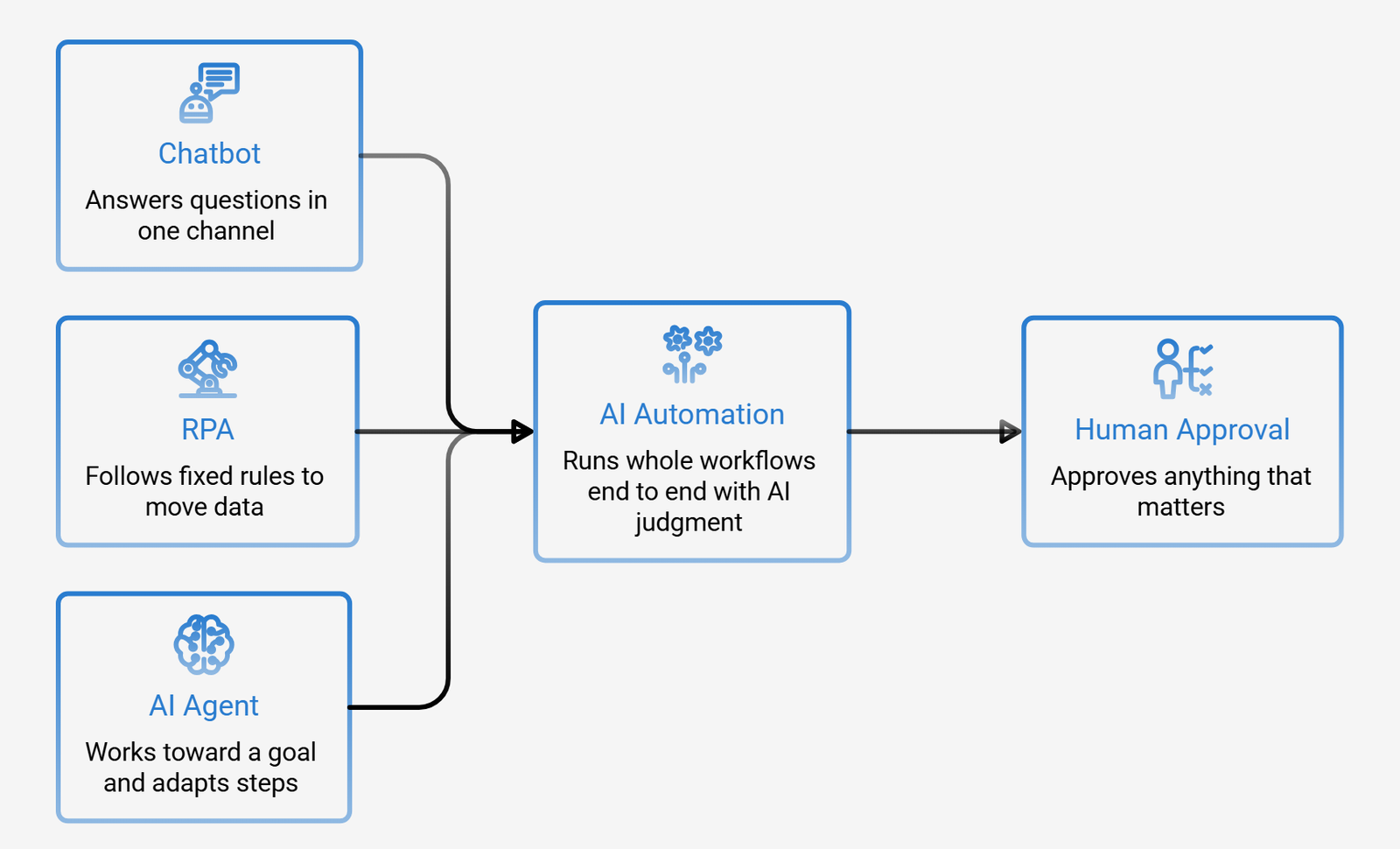
Why Human Supervision Still Matters
Automation should not mean handing every business decision to software. Human oversight is particularly important when a process involves financial commitments, sensitive customer information, unusual transactions, or decisions that could have serious consequences. A properly designed workflow handles routine activities independently while directing exceptions to an appropriate employee. The objective is straightforward: allow software to manage predictable tasks and reserve human expertise for situations where it genuinely matters.
Why Australian Businesses Are Investing in AI Automation
Several developments are making automation a practical consideration for businesses across Australia.
1. Increasing Employment and Administrative Expenses
Recruiting and retaining employees involves more than paying salaries. Businesses must also account for superannuation, training, leave entitlements, equipment, and other employment-related expenses. When qualified employees spend a significant portion of their working day transferring information between applications, the business is not making the best use of its available workforce. AI automation can reduce this administrative pressure and help existing teams manage larger workloads without continuously increasing headcount.
2. Customers Expect Faster Responses
Customer expectations have changed considerably. Someone submitting a quotation request on Friday does not necessarily want to wait until Monday for an acknowledgement. Similarly, a customer contacting a business outside normal office hours may expect at least an initial response. Automated enquiry handling, customer notifications, and follow-up sequences help businesses maintain communication even when employees are unavailable.
3. Automation Is More Accessible to Smaller Companies
Advanced automation was once associated primarily with large corporations that had dedicated IT departments and substantial technology budgets. That situation has changed. AI models, workflow platforms, and application integrations have made these capabilities accessible to smaller organisations as well. A business with 20 employees in Brisbane or Perth can now explore automation without building an entire technology department.
4. Delaying Automation Can Create a Competitive Disadvantage
Businesses that respond quickly, process transactions accurately, and manage enquiries efficiently are often better positioned to retain customers. Meanwhile, companies relying entirely on manual administration may experience increasing costs as their transaction volumes grow. Over time, the difference in operating efficiency can become significant.
Privacy and Data Protection Responsibilities
Australian businesses must consider their privacy obligations before introducing automated systems. The Privacy Act 1988 and Australian Privacy Principles (APPs) establish requirements concerning the collection, use, disclosure, and handling of personal information where applicable.
Using AI does not remove these responsibilities. Businesses should examine where customer information is stored, who can access it, how third-party services process it, and whether appropriate security controls are in place. Access restrictions, secure integrations, and reliable activity records should form part of the implementation from the beginning.
How an AI Automation Workflow Operates
Although automated systems can handle different responsibilities, most follow a similar sequence of activities.
1. Trigger: Something initiates the process
An event activates the workflow. This might be a newly received email, an online form submission, an incoming invoice, or a customer message.
2. Information processing: The system examines the content
The AI reads the available information, whether it comes from an email, PDF document, scanned invoice, or customer conversation.
It identifies the relevant details, such as names, transaction amounts, order references, and required dates.
3. Decision-making: The system identifies the appropriate response
The extracted information is assessed against instructions and conditions established by the business.
Straightforward requests can continue automatically. Unusual transactions, unclear information, or high-value activities can be forwarded for human approval.
4. Execution: The workflow performs the required actions
Depending on the assignment, the software might update a CRM, generate an invoice, send a customer notification, schedule an appointment, or alert an employee.
These activities take place through integrations with the business applications already in use.
5. Record keeping: Every action is documented
The system maintains a record of completed activities, decisions, and exceptions. This makes it easier to investigate problems, review performance, and maintain accountability.

Practical Benefits of AI Automation for Australian Businesses
The value of automation becomes clearer when it is connected to measurable operational improvements.
| Business Benefit | What Improves | Practical Example |
|---|---|---|
| Time savings | Employees spend fewer hours completing repetitive activities. | Supplier invoices are processed without manual re-entry. |
| Accuracy | Reduced copying and repetitive data handling lowers the risk of errors. | Order information is extracted directly from incoming emails. |
| Faster communication | Customers receive responses and quotations sooner. | A quotation reminder is sent on the same morning. |
| Consistent service | Enquiries follow a defined response process. | Customer messages received over the weekend are acknowledged automatically. |
| Business growth | Higher transaction volumes can be managed without equivalent increases in administrative staffing. | A system processes 200 orders using much of the same workflow required for 20. |
| Better reporting | Automated activities generate useful operational information. | Management can examine quotation follow-ups and conversion results. |
The best way to evaluate an initial automation project is to measure the time it saves rather than rely on broad promises about artificial intelligence. Record how many hours a particular process consumes, introduce automation, and compare the results. If the chosen workflow does not deliver a reasonable return within the expected period, reassess the process before investing further.
Which Business Processes Should You Automate First?
Not every activity is an appropriate candidate for automation. The most suitable starting points usually involve repetitive work, substantial transaction volumes, and clearly defined instructions. The following areas offer practical opportunities.
| Department | Recommended Automation | How It Works |
|---|---|---|
| Sales | Lead qualification and quotation follow-ups | New enquiries are reviewed, categorised, and directed to the appropriate salesperson. |
| Customer Support | Common enquiries and order tracking | Customers receive delivery updates using information from live tracking systems. |
| Finance | Invoice processing and payment reminders | Supplier invoices are read, matched against relevant records, and entered into accounting software. |
| Operations | Appointment booking and scheduling | Bookings are confirmed, reminders are distributed, and calendars are updated. |
| Human Resources | Leave requests and employee onboarding | Documents are collected, organised, and forwarded for the required approvals. |
| Marketing | Lead collection and review requests | New customer details are recorded and review invitations are sent at suitable times. |
One principle applies across all these departments: start with activities that happen frequently and follow recognisable rules. A process that requires individual judgment at every stage may need to be redesigned before automation becomes worthwhile.
Real-World Examples of AI Automation Across Different Industries
The applications of automation become easier to understand when examined through everyday business situations.
1. Electrical Wholesalers: Automated Supplier Invoice Processing
Consider Mara’s wholesale business in Brisbane.
Previously, employees spent their mornings opening supplier invoices and entering transaction information into the accounting platform.
With an automated workflow, supplier PDFs arrive through email and are examined by an AI-powered document processing system.
The software extracts invoice details, checks them against purchase orders, and transfers matching information into the accounting system.
If an invoice contains an incorrect price, missing reference number, or other discrepancy, it is placed in a review queue.
Employees therefore spend less time entering figures and more time looking after customers and managing supplier relationships.
2. Plumbing Companies: Automated Quotation Follow-Ups
A plumbing business in Adelaide regularly sends quotations to potential customers.
Without automation, the plumber must remember which customers need another call and when to contact them.
An automated workflow can send a courteous follow-up two days after a quotation is issued.
If the customer accepts, the system can provide a booking link and notify the relevant employee.
This allows the business to manage enquiries while plumbers remain focused on their jobs rather than checking their phones throughout the day.
3. E-commerce Businesses: Automated Order Tracking
Online retailers frequently receive messages asking about delivery progress.
An automated customer support workflow can identify the order number, retrieve the latest tracking information, and send the customer an update.
If the parcel appears delayed or the tracking information is unclear, the enquiry can be escalated to a support employee.
This reduces the number of routine support requests that require manual attention.
4. Accounting Firms: Automated Document Collection
Accounting practices often experience a substantial increase in administrative work during tax season.
An automated document intake system can collect client submissions, organise files according to customer and document category, and identify missing information.
It can also send reminders to clients who have not submitted all the required paperwork.
The accountant remains responsible for reviewing financial information and providing professional advice, while the software handles much of the document organisation and follow-up.
These examples share one important characteristic. None requires replacing employees. The purpose is to remove repetitive responsibilities so experienced people can concentrate on more meaningful work.
How to Implement AI Automation Without Disrupting Your Business
Automation projects often become unnecessarily complicated because businesses attempt to transform several departments simultaneously.
A more dependable approach is to begin with one clearly defined process, test its performance, and expand only after achieving satisfactory results.
The following five-stage method provides a sensible starting point.
| Implementation Stage | What Needs to Happen | Requirement Before Moving Forward |
|---|---|---|
| 1. Identify the Bottleneck | Select a repetitive process and document every step involved. | The workflow is identified, its time requirements are measured, and an owner is assigned. |
| 2. Run a Small Pilot | Test automation on the selected process for two to four weeks. | The pilot operates without creating additional administrative work. |
| 3. Develop the Workflow | Connect the relevant applications, establish operating rules, and configure approval points. | Approximately nine out of ten routine executions can proceed without manual intervention, where appropriate for the process. |
| 4. Introduce Human Oversight | Establish exception handling, approval procedures, and activity records. | Every automated action is recorded and can be corrected or reversed where the system permits. |
| 5. Measure and Expand | Evaluate time savings, error frequency, and response speed. | The next automation project is selected using actual performance results. |
Two precautions deserve particular attention.
1. First, avoid automating an inefficient process without correcting its underlying problems. Otherwise, the software may simply reproduce existing mistakes at a much greater speed.
2. Second, do not allow a successful pilot to become a fully operational system without proper supervision. Approval procedures and exception handling should remain part of the workflow.
Technologies Behind Modern AI Automation Systems
Business owners do not need an advanced understanding of software engineering to evaluate an automation solution. However, knowing the main components helps when discussing requirements with a development company.
Most solutions rely on four essential elements.
1. Artificial Intelligence Models
These models interpret written information, recognise context, extract relevant details, and generate responses.
2.Workflow Automation Platforms
These tools coordinate individual activities and determine how information moves from one stage to another.
3.Application Programming Interfaces (APIs)
APIs allow different business applications to exchange information. For example, they can connect accounting software with a CRM, email platform, or inventory management system.
4.Document Processing Technology
Document reading tools extract usable information from PDFs, scanned invoices, forms, and other business documents. Together, these components allow existing applications to communicate without necessarily replacing the software a business already uses.
What to Ask About Security Before Choosing a Provider
Security should be considered before an automation project moves into development.
Ask your prospective provider three straightforward questions:
- Where will our business and customer information be stored?
- Which employees, applications, and third parties can access that information?
- Does the system maintain a record of automated activities?
A reliable provider should be able to explain its data storage arrangements, access restrictions, security measures, and logging procedures clearly. Businesses should also establish appropriate retention policies and review how external AI services handle submitted information.
Scaling Automation Across Multiple Departments
Once the first workflow performs reliably, introducing additional automations becomes easier. For example, a business that has already connected its CRM and accounting platform may be able to reuse those integrations for quotation follow-ups, invoice processing, and payment reminders. However, expansion should follow operational evidence rather than enthusiasm for new technology. One well-designed workflow is more valuable than several poorly supervised automations.
How Much Does AI Automation Cost in Australia?
The cost of AI automation depends on the requirements of the project. There is no single price that accurately represents every business automation solution. A simple workflow involving one application may require considerably less development than a system connecting multiple platforms, processing complex documents, and handling sensitive business transactions.
Several factors influence the overall investment:
- Number of workflows: Automating one administrative activity is generally less involved than connecting several departments.
- System integrations: Connecting accounting platforms, CRMs, email applications, and inventory systems affects development requirements.
- Data quality: Poorly organised or inconsistent records may require additional preparation.
- Human approval requirements: Workflows involving financial or sensitive decisions may require additional review stages.
- Ongoing maintenance: AI models and connected applications may need monitoring, adjustments, and performance improvements.
A single pilot is usually a more sensible financial commitment than attempting a business-wide implementation immediately. For a related discussion of development expenses, read our guide to Chatbot Development Cost in Australia in 2026. The more useful question is not simply how much automation costs. It is how much the existing manual process costs your business. Calculate the hours employees spend completing the task, multiply those hours by their employment cost, and compare the result with the proposed development and operating expenses. This provides a more realistic basis for deciding whether an automation project is commercially worthwhile.

Why Australian Businesses Choose DevVibe for AI Development
DevVibe develops AI solutions for Australian businesses that want practical improvements to their everyday operations. Rather than focusing on demonstrations that look impressive but offer little operational value, the emphasis is on developing software that can be integrated into real business environments.
Our AI development services cover several areas, including:
- AI agents designed to perform multi-stage business activities.
- Chatbots that manage customer enquiries and provide round-the-clock assistance.
- AI-powered workflow solutions that reduce repetitive administrative work.
- LLMOps services that support the deployment, monitoring, and maintenance of AI applications.
Businesses exploring these technologies can also read our AI Copilot Development in Australia guide and learn more about LLMOps Development Services. Our approach remains consistent across projects: identify an actual business problem, develop a suitable solution, test its performance, and expand when the results justify further investment. If your business is considering automation, start by identifying the one administrative process that consumes the most time.
Frequently Asked Questions About AI Automation in Australia
Q1: What is AI automation, and how does it work?
A: AI automation uses artificial intelligence and workflow software to complete multi-stage business activities. It can read information, identify relevant details, make decisions according to predefined rules, perform actions across connected applications, and refer unusual situations to employees for review.
Q2: What are the five main stages of an AI automation workflow?
A: A typical workflow involves five stages: triggering an activity, reading and interpreting information, deciding the next action, executing that action across connected systems, and recording the results. Human approval can be included whenever a situation requires additional judgment.
Q3: What are some common examples of AI automation for Australian businesses?
A: Common applications include supplier invoice processing, quotation follow-ups, customer enquiry management, order tracking, appointment scheduling, payment reminders, employee onboarding, and document organisation. These solutions are particularly useful when businesses regularly repeat the same administrative activities.
Q4: What is AI workflow automation?
A: AI workflow automation applies artificial intelligence to a defined sequence of business activities rather than an isolated task. For example, a quotation workflow might receive an enquiry, record customer information, prepare a response, schedule a follow-up, and update the CRM. It connects these activities into one coordinated process.
Q5: How much does AI automation cost in Australia?
A: Pricing depends on the number of workflows, required integrations, data quality, complexity, and level of human supervision. A small pilot involving one business process is generally a more manageable starting point than automating an entire organisation. Businesses should compare the proposed investment against the existing cost of manual work.
Q6: Can AI automation replace employees in Australian businesses?
A: AI automation is generally most effective when it supports employees rather than removes the need for human involvement. It can take responsibility for repetitive activities such as data entry, document processing, and routine customer responses. Employees can then focus on problem-solving, customer relationships, and decisions requiring professional judgment.
Q7: Is AI automation suitable for small and medium-sized businesses?
A: Yes. Small and medium-sized businesses can benefit from automating specific processes without investing in a large enterprise-wide system. Starting with a frequently repeated task, such as invoice processing or customer follow-ups, allows a business to assess the benefits before expanding.
Q8: Is AI automation secure for Australian businesses?
A: It can be implemented with appropriate security measures, but businesses must carefully assess how personal and commercial information is collected, processed, and stored. Access controls, secure integrations, activity logs, and compliance with applicable privacy obligations should be considered during development.
Conclusion
AI automation in Australia is no longer limited to large corporations with extensive technology departments. Small and medium-sized businesses can also use it to reduce administrative workloads, improve response times, and manage growing operations more effectively.The most sensible starting point is not an ambitious plan to automate every department. It is one troublesome workflow that repeatedly consumes employee time.
Identify the problem, measure its current cost, test a suitable solution, and retain human supervision where necessary. Once the results are clear, consider expanding into other areas of the business. A 25-person wholesale company in Brisbane can benefit from this approach just as much as a much larger organisation. If your business is ready to explore practical automation opportunities, speak with DevVibe about the process you would like to improve first.