Australia:
For an Australian organisation, a compromised administrator account can turn a small security incident into a very large problem. A standard employee account might provide access to email or a single business application. A privileged account can potentially change security settings, create new users, access databases, modify cloud infrastructure, disable controls or move deeper into the network.
That is why Privileged Access Management (PAM) has become an important part of modern cybersecurity. PAM is not simply another password-management product. Done properly, it creates a controlled process around the most powerful identities in an organisation, including administrators, database administrators, cloud super-users, service accounts and other identities capable of making high-impact changes.
The Australian Signals Directorate’s current guidance is particularly relevant here. Its system-access guidance identifies privileged accounts as accounts capable of altering or circumventing security controls and recommends controls including dedicated privileged accounts, multi-factor authentication, just-in-time administration and centralised logging.
For Australian businesses, PAM also fits neatly into a wider security strategy involving the Essential Eight, Zero Trust, identity security, penetration testing, incident response and privacy protection. The objective is straightforward: give people the access they need to do their jobs, but make unnecessary or permanent administrative access much harder to abuse.
Why Privileged Access Management Matters for Australian Businesses
Modern businesses rarely operate from one tidy server room anymore. Your organisation might have Microsoft 365, cloud infrastructure, SaaS applications, remote-access tools, databases, endpoints, development environments, third-party suppliers and several administrators working across different locations. Every one of those environments can introduce privileged accounts, and each account can become another potential path into critical systems.
The Australian Cyber Security Centre’s 2024–25 Annual Cyber Threat Report highlights why identity security deserves attention. ASD reported that compromised accounts or credentials were involved in 42% of the top three categories of reported incidents at C3 severity and above, while credential theft remained an important method used by cybercriminals. The same report states that ransomware remained the most disruptive cybercrime threat and that ASD’s ACSC responded to 138 ransomware incidents during FY2024–25.
PAM addresses a specific weakness in this environment: excessive privilege. If an administrator has permanent access to dozens of systems, a stolen credential may give an attacker a ready-made route to those systems. If that same access is restricted, time-limited, strongly authenticated and monitored, the attacker’s room to manoeuvre becomes considerably smaller.
Think of privileged access as the master key ring for your digital building. You would not leave every master key permanently hanging beside the front door simply because the facilities team might need one later. PAM applies the same principle to digital infrastructure.
For Australian organisations, that can mean separating everyday accounts from administrator accounts, requiring MFA for privileged activity, storing sensitive credentials securely, approving elevated access when necessary and maintaining logs that show what happened.
What Is Privileged Access Management (PAM)?
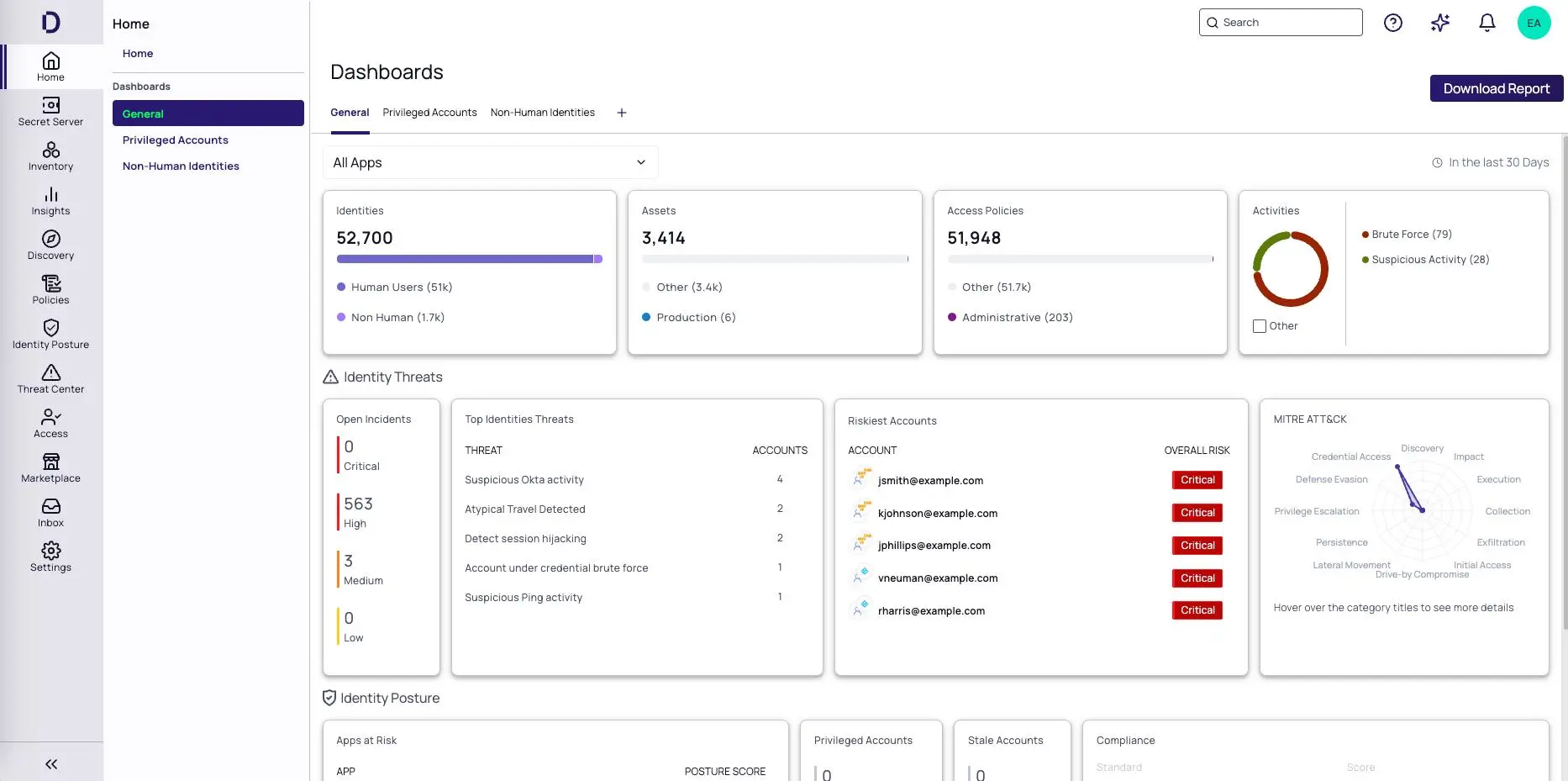
Privileged Access Management, commonly abbreviated to PAM, is a cybersecurity discipline used to control, protect and monitor accounts and identities with elevated permissions. Microsoft describes PAM as an identity-security approach that helps monitor, detect and prevent unauthorised privileged access to critical resources. Palo Alto Networks similarly describes PAM as a combination of controls and technologies used to secure elevated access, including credential protection, least privilege, privileged sessions and monitoring.
In practical terms, PAM answers several questions that ordinary authentication does not fully answer:
- Who is requesting privileged access?
- What system are they trying to access?
- Why do they need access?
- What permissions should they receive?
- How long should those permissions remain active?
- Was the access approved?
- What did the administrator actually do?
- Can the activity be traced afterwards?
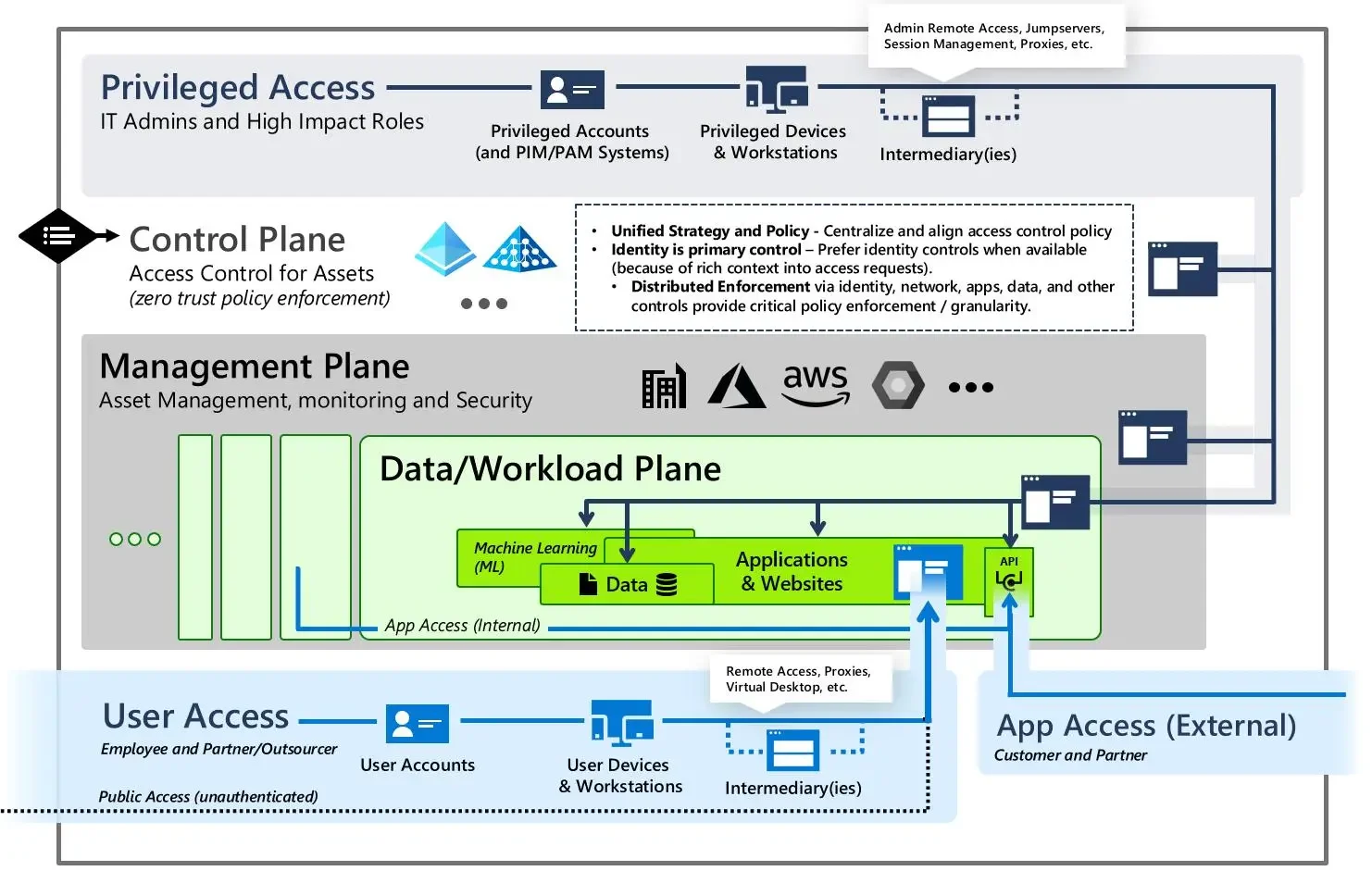
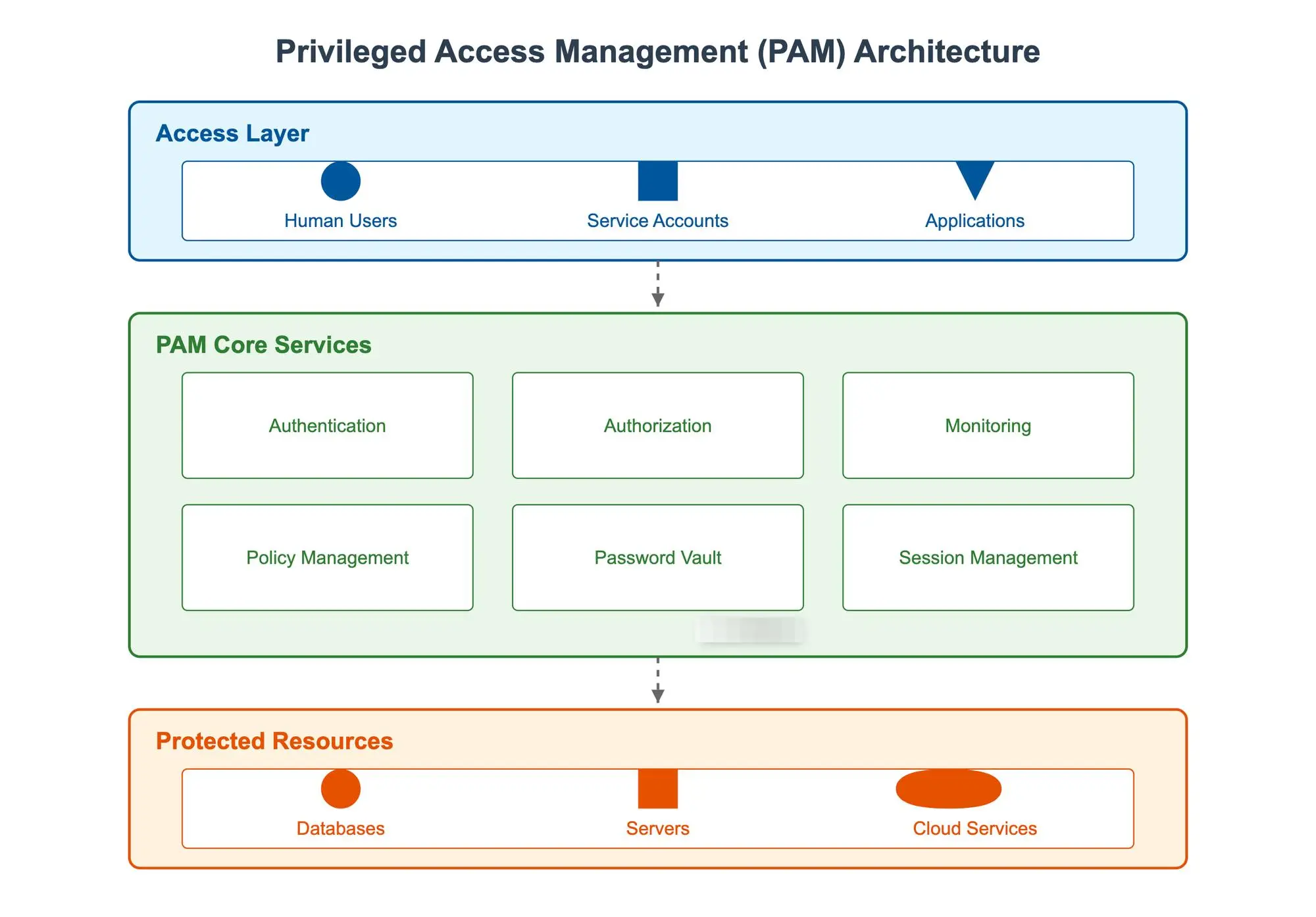
A mature PAM strategy therefore goes beyond simply changing administrator passwords. It combines identity, authentication, authorisation, credential security, privilege elevation, session management, monitoring and governance.
This is particularly important as organisations move workloads into cloud platforms. Privileged identities are no longer limited to traditional Windows domain administrators. They can include cloud administrators, DevOps accounts, database accounts, API credentials, service accounts, automation identities and other non-human identities.
What Counts as a Privileged Account?
A privileged account is generally an account with permissions that allow it to make changes that ordinary users cannot make. The exact definition depends on the environment, but common examples include domain administrators, infrastructure administrators, database administrators, cloud administrators and security administrators.
The Australian Government’s Essential Eight guidance defines privileged user accounts around their ability to modify system configurations, account privileges, event logs or application security configurations. It also recognises that privileged accounts can belong to people or services. That distinction matters because businesses sometimes focus heavily on human administrators while forgetting about machine identities.
A service account that can access a production database may not have a person sitting behind it, but it can still be extremely powerful. The same applies to automation credentials, SSH keys, API tokens and cloud service identities. A sensible PAM programme should therefore catalogue privileged identities across the organisation rather than looking only at obvious administrator usernames.
PAM vs IAM: What Is the Difference?
Identity and Access Management (IAM) and Privileged Access Management (PAM) overlap, but they solve different parts of the access problem. IAM generally manages identity lifecycle and access for a broad population of users. It answers questions such as who the user is, how they authenticate and which applications they can access.
PAM focuses specifically on high-risk, elevated access.
| Area | IAM | PAM |
|---|---|---|
| Main purpose | Manage identities and access | Secure privileged identities and access |
| Typical users | Employees, contractors, customers | Administrators, DBAs, cloud admins, service identities |
| Authentication | SSO, MFA and identity policies | Strong authentication plus privileged controls |
| Access model | Role and policy based | Least privilege, approval and often JIT |
| Credential management | User credentials | Privileged credentials, secrets and keys |
| Session monitoring | Varies | Detailed privileged activity monitoring |
| Main objective | Control identity access | Reduce risk from elevated access |
The two should work together rather than being treated as competing technologies. A strong IAM foundation can establish identity and authentication, while PAM adds tighter controls around the identities that can make the most consequential changes.
The Australian Cyber Threat Landscape
Australian organisations operate in a threat environment where stolen credentials, ransomware, phishing, exploitation of exposed systems and compromised accounts can all lead to significant disruption. ASD‘s latest Annual Cyber Threat Report notes continued growth in reported financial losses, ransomware incidents and data breaches during FY2024–25.
This does not mean every organisation needs an enormous security platform with dozens of products. It does mean businesses should understand which identities have the power to cause the most damage and put stronger controls around them.
A useful starting point is to ask a simple question: If an attacker obtained this account’s credentials today, what could they change?
That question can reveal accounts that have accumulated permissions over years, inactive administrator accounts, shared credentials, excessive service-account permissions and cloud identities that were created for a temporary project but never properly removed.
Why Stolen Credentials Are a Serious Risk
Credentials are attractive to attackers because they can provide access without immediately looking like malicious activity. If someone logs in using valid credentials, traditional perimeter controls may have less information with which to distinguish the activity from legitimate behaviour.
ASD’s 2024–25 reporting specifically recommends measures such as phishing-resistant MFA, changing compromised credentials, removing inactive user and service accounts, implementing robust credential management and disabling unnecessary remote management.
PAM complements those controls by reducing the value of a stolen privileged credential. Instead of keeping a powerful password permanently available to an administrator, a PAM architecture can place the credential in a protected vault, require stronger authentication, provide access only when needed and record the resulting session. Some implementations can rotate credentials automatically after use or provide temporary access rather than exposing the underlying secret. That changes the economics of an attack. A stolen ordinary credential may still be serious, but a tightly controlled privileged identity is much harder to turn into persistent administrative access.
How Ransomware Can Exploit Privileged Access
Ransomware is not simply a file-encryption problem. Once attackers gain access to an environment, they may attempt to obtain higher privileges, disable security controls, move between systems and access backup infrastructure before launching disruptive actions. ASD reported ransomware as the most disruptive cybercrime threat in FY2024–25 and recorded 138 ransomware incidents to which the ACSC responded.
If the same account used for ordinary email, web browsing and administrative work has extensive privileges, compromise of that account can create an unnecessarily broad attack path. The Essential Eight therefore includes requirements around separating privileged and unprivileged operating environments and restricting administrative privileges. PAM can reinforce that model by ensuring elevated privileges are provided deliberately rather than treated as a permanent feature of someone’s everyday account.
PAM and Australian Cybersecurity Requirements
PAM is not itself a single Australian regulatory requirement. Rather, it is a set of security controls that can help organisations address requirements and recommendations relating to privileged access, authentication, logging, information security and risk management.
For Australian organisations, two particularly useful reference points are the Essential Eight published by the Australian Signals Directorate and the Australian Privacy Principles, particularly APP 11.

Essential Eight and Restricting Administrative Privileges
The Australian Government’s Essential Eight maturity model explicitly includes Restrict administrative privileges as one of its eight mitigation strategies. At different maturity levels, the model addresses controls such as validating requests for privileged access, disabling access after periods of inactivity, using dedicated privileged accounts, separating privileged and unprivileged environments, using Secure Admin Workstations, implementing just-in-time administration and centrally logging privileged activity. The current ASD system-access guidance also identifies multi-factor authentication for privileged human users and just-in-time administration as relevant controls.
This makes PAM highly relevant when an Australian organisation is working towards stronger Essential Eight maturity. It is important, however, not to treat purchasing a PAM platform as equivalent to achieving Essential Eight maturity. The maturity model covers processes, configuration and operational practices across the wider environment. PAM can support several of those controls, but implementation needs to be assessed against the actual requirements of the organisation.
Privacy Act and APP 11 Security Obligations
Privacy is another reason privileged access deserves attention. The Office of the Australian Information Commissioner states that organisations covered by the Australian Privacy Principles must take reasonable steps to protect personal information from misuse, interference and loss, as well as unauthorised access, modification and disclosure.
The OAIC’s updated APP 11 guidance explains that reasonable steps include both technical and organisational measures and can include governance, ICT security, access security, third-party providers, data-breach management and other controls.
That does not mean APP 11 mandates a particular PAM product. Instead, it reinforces the broader principle that organisations need reasonable security measures appropriate to the circumstances. If administrators can access customer records, employee information, financial information or other personal data, privileged access becomes part of the information-security picture. PAM can therefore contribute to a layered security strategy by helping an organisation control who can access sensitive systems, monitor privileged activity and maintain evidence for security investigations.
Core Privileged Access Management Controls
A practical PAM strategy is built from several controls working together. The goal is not to create bureaucracy around every IT task. The goal is to introduce stronger safeguards where the consequences of misuse are highest.
Discover and Inventory Privileged Accounts
The first step should be identifying privileged accounts across the environment. That may include Active Directory accounts, Microsoft Entra identities, cloud administrator roles, database accounts, network-device accounts, security tools, service accounts, automation credentials, SSH keys and emergency or “break glass” accounts.
The inventory should identify the owner, purpose, permissions, system, authentication method, last use and business justification for each privileged identity. Inactive accounts deserve particular attention. ASD’s latest cyber threat reporting recommends finding and removing inactive user and service accounts as part of reducing credential-related risk. Once the inventory exists, organisations can begin asking whether each account genuinely needs its current level of access.
This is where least privilege becomes practical rather than theoretical. If an administrator only needs access to one environment to complete a specific task, giving them permanent access to every production system creates unnecessary exposure.
Use MFA, Credential Vaulting and Just-in-Time Access
Strong authentication should sit at the heart of privileged access. The ASD’s current guidance requires MFA for privileged human users in the relevant environments and identifies just-in-time administration as a control. But MFA should not be treated as the entire PAM strategy.
A mature implementation can combine MFA with:
- Credential vaulting to protect sensitive administrator passwords and secrets.
- Password rotation to reduce the lifespan of exposed credentials.
- Just-in-time access to provide privilege only when required.
- Time-limited permissions to automatically remove elevated access.
- Approval workflows for sensitive operations.
- Role-based access controls to reduce unnecessary privilege.
- Emergency access controls for genuine break-glass situations.
- Secret management for service accounts, API keys and other non-human identities.
The Australian Government’s Essential Eight maturity model also includes controls for long, unique and unpredictable credentials for break-glass, local administrator and service accounts at higher maturity levels.

Monitor, Record and Audit Privileged Sessions
Controlling access is only half the job. You also need visibility into what happens after access is granted. Session monitoring can record privileged activity such as administrator logins, commands, configuration changes and other actions depending on the system and PAM architecture. The ASD’s system-access guidance includes centralised logging of privileged access events and privileged account or security-group management events.
This creates valuable evidence for security teams. If a suspicious configuration change appears on a server at 2:17 am, investigators should ideally be able to determine which identity performed it, where the session originated, whether the access was authorised and what actions occurred.
Good logging can also support incident response, compliance activities and internal investigations. The objective is not to record everything simply because technology allows it. Logging should be designed around meaningful security questions and retained in a way that protects the evidence from unauthorised modification.
How to Implement PAM in an Australian Organisation
PAM implementation works best as a programme rather than a software installation project. A business can purchase a PAM platform and still have poor privileged-access security if it fails to discover accounts, define ownership, remove excessive privileges, configure authentication correctly or review activity. Start with the accounts and systems that could cause the most damage. Then expand the programme progressively.
Assess Your Current Privileged Access
Begin with an assessment of the existing environment.
Map critical systems, administrator accounts, service accounts, cloud roles and third-party access. Identify where credentials are stored, how administrators authenticate, which accounts have permanent privilege and where privileged sessions are currently logged.
A useful assessment should answer questions such as:
- How many privileged accounts exist?
- Who owns each account?
- Which accounts are shared?
- Which privileged accounts have MFA?
- Which accounts have unnecessary permissions?
- Which service accounts are still active?
- How are administrator passwords stored?
- Are privileged sessions logged?
- Can inactive accounts be identified and removed?
- Can emergency access be controlled and audited?
This assessment can also be combined with broader security testing.
For organisations considering an Australian security assessment, DevVibe’s penetration testing services can be used alongside access-control reviews to identify weaknesses from an attacker’s perspective.
Deploy Controls and Continuously Improve Them
After the assessment, prioritise the highest-risk privileged identities. A sensible rollout can start with administrator accounts controlling critical infrastructure, production systems, identity platforms, databases and security tooling. From there, expand into service accounts, cloud identities, third-party access and other privileged credentials.
The implementation should also include operational procedures. Someone needs to own privileged-access approvals. Someone needs to review logs. Someone needs to investigate suspicious activity. Someone needs to remove access when an employee changes roles or leaves. This is where PAM intersects with information-security management.
If your organisation is also working towards ISO 27001, access control should be considered alongside risk management, governance, security monitoring and continual improvement. DevVibe’s recent ISO 27001 certification guide for Australian organisations covers the wider certification journey, including access reviews, security testing, incident management and continual improvement. PAM should evolve with the business. New cloud services, acquisitions, remote workers, contractors, applications and automation can all introduce new privileged identities. A quarterly review might find one issue. A continuous process can find the next issue before it becomes an incident.
PAM, Penetration Testing and Security Validation
PAM and penetration testing solve different problems, which is precisely why they work well together. PAM establishes controls around privileged access. Penetration testing evaluates whether security controls can withstand realistic attack paths.
For example, a penetration test may identify a path from a low-privilege user account towards a higher-privilege identity. It may uncover excessive permissions, exposed administrative interfaces, weak authentication controls, insecure service accounts or configuration weaknesses.
A PAM programme can then address some of those weaknesses through privilege reduction, stronger authentication, credential protection, session controls or just-in-time access. DevVibe’s current security offering covers web application and API penetration testing, mobile application and cloud configuration testing, as well as internal and external network testing.
The two approaches can therefore form a useful security cycle:
Discover → Reduce privilege → Protect credentials → Test controls → Monitor → Remediate → Retest
This matters because a security architecture is never truly finished. New applications appear, permissions change, administrators move teams, vendors receive temporary access and cloud environments evolve. Testing provides an external challenge to the assumptions made during implementation. For businesses pursuing formal security frameworks, penetration testing can also provide useful evidence as part of a broader security programme, although testing alone does not constitute compliance or certification.
Conclusion
Privileged Access Management in Australia is fundamentally about controlling the identities that can make the biggest changes to your digital environment. The Australian cybersecurity landscape makes that increasingly important. ASD’s latest reporting highlights credential compromise and ransomware as significant threats, while the Essential Eight specifically calls for organisations to restrict administrative privileges. Current ASD guidance also points towards dedicated privileged accounts, MFA, just-in-time administration and centralised logging.
For organisations handling personal information, the OAIC’s APP 11 guidance adds another reason to take access security seriously. Covered organisations need reasonable technical and organisational measures to protect personal information from unauthorised access, modification and disclosure.
A practical PAM strategy should therefore focus on visibility, least privilege, strong authentication, credential protection, temporary access, privileged-session monitoring and continuous review. The goal is not to make administrators’ jobs unnecessarily difficult. It is to make powerful access deliberate, traceable and appropriately protected.
If your Australian business is reviewing its administrator accounts, cloud permissions, internal network security or broader cyber risk, DevVibe can help you assess and test the environment. Explore DevVibe’s Australian cybersecurity and penetration testing services to discuss a security assessment tailored to your systems and risk profile.
FAQs
Q1.What are the core components of a privileged access management solution?
A. Core PAM components include credential vaulting, least-privilege access, multi-factor authentication (MFA), just-in-time access, session monitoring and privileged activity logging. Together, these controls help reduce unauthorised access and protect critical systems.
Q2.How can I implement privileged access management in my business securely?
A. Start by identifying privileged accounts, systems and access risks, then apply least privilege, MFA, credential vaulting and just-in-time access. Review permissions regularly and monitor privileged sessions to maintain secure access.
Q3. What are the best privileged access management tools available in Australia?
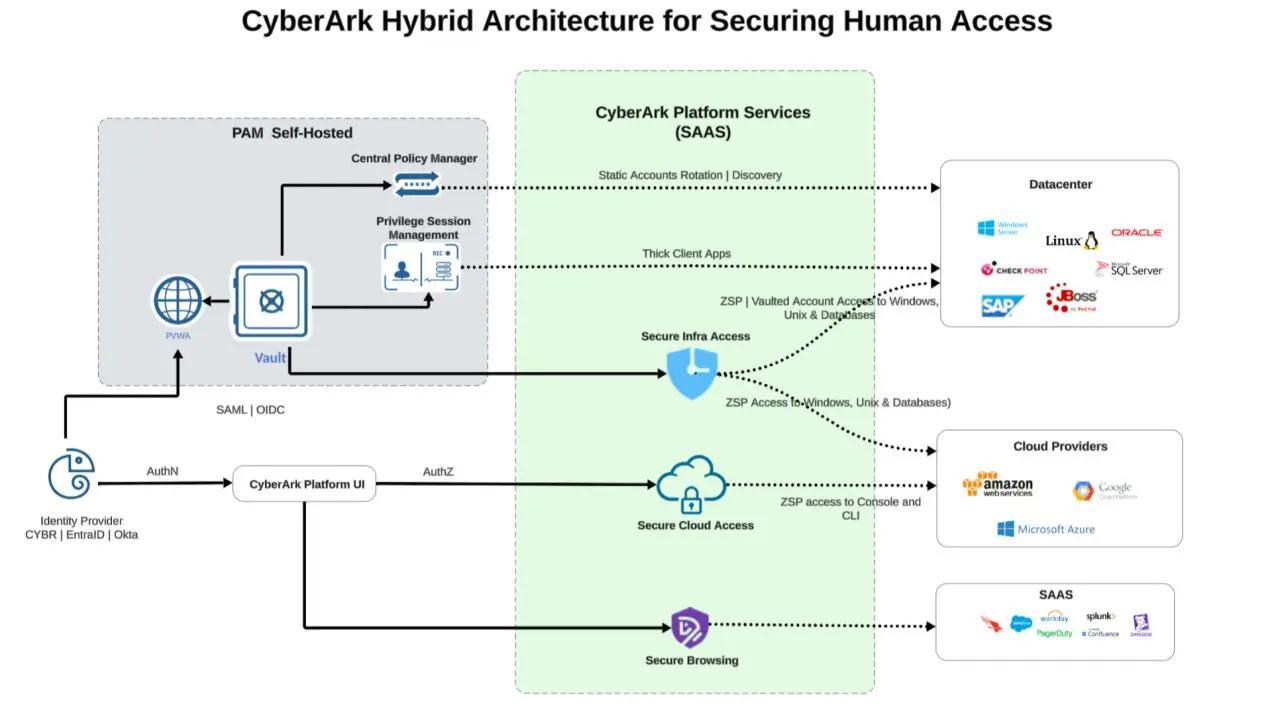
A. Common enterprise PAM platforms include CyberArk, Microsoft Entra Privileged Identity Management, BeyondTrust and Delinea. The right option depends on your organisation’s infrastructure, compliance requirements, budget and integration needs.
Q4. How can penetration testing support a PAM programme?
A. Penetration testing can identify weaknesses such as excessive privileges, exposed credentials, misconfigured access controls and paths to privileged accounts. It provides practical evidence that can help validate and strengthen your PAM controls.
Q5. Is MFA enough to protect administrator accounts?
A. No. MFA adds an important layer of protection, but it does not replace PAM controls such as least privilege, credential vaulting, just-in-time access and privileged session monitoring.